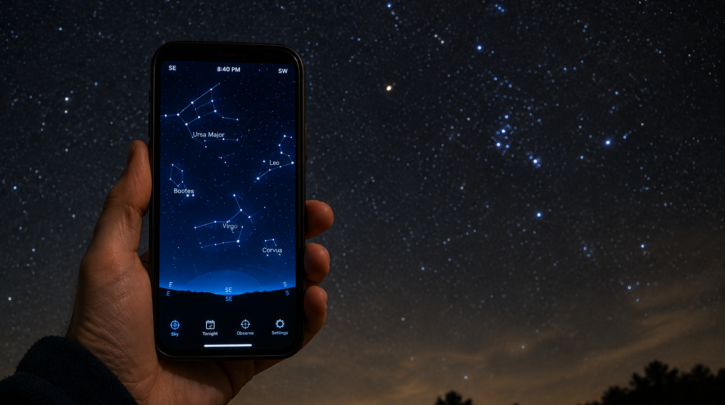

Stargazing apps fall into two broad categories: point-your-phone-at-the-sky augmented reality apps that identify what you’re looking at instantly, and full planetarium software that lets you plan a session, look up rise and set times, and explore the sky in detail from your couch. Most serious stargazers end up using both.
AR Sky-Pointing Apps
Apps like SkyView and Star Walk use your phone’s camera, compass, and GPS to overlay constellation lines and object labels directly on the live view of the sky, which is by far the fastest way for a beginner to answer “what am I looking at” in the moment. The tradeoff is that they’re less detailed than full planetarium software and depend on accurate phone sensors, which can occasionally drift or need recalibrating.
Planetarium Software
Stellarium (free, available on desktop and mobile) and SkySafari are full planetarium programs that simulate the sky for any date, time, and location — past, present, or future — rather than just showing what’s overhead right now. These are the better tools for planning ahead: checking when a planet rises, finding out if a target will be above the horizon at a specific hour, or scouting a session before you ever step outside.
Night Mode Is Non-Negotiable
Whatever app you use, enable its red-light or night mode before heading outside. A bright white phone screen destroys the 20 to 30 minutes of dark adaptation your eyes need to see faint objects, and it takes just as long to recover after one bright glance; see our stargazing basics guide for why dark adaptation matters so much.
Offline Maps for Remote Trips
If you’re planning a session at a remote dark-sky site, download offline maps and check that your stargazing app can function without a data signal well before you go — cell coverage is often nonexistent at exactly the kind of remote locations serious stargazers travel to; see our dark-sky destinations guide for where those trips tend to lead.
Astrophotography Planning Apps
For photographers specifically, apps like PhotoPills add tools tailored to planning shots — Milky Way core visibility windows, moon phase and rise times, and augmented-reality previews of exactly where the Milky Way or a specific object will sit relative to a foreground landscape at a given time; see our astrophotography guide for how this kind of planning fits into a shoot.
Apps for Smart Telescope Control
If you own or are considering a smart telescope, the manufacturer’s own app is effectively mandatory rather than optional, since it handles target selection, automated pointing, and image stacking directly. Unistellar’s app, for example, controls their eVscope and Odyssey lines and lets you pick a target from a built-in catalog rather than identifying it yourself first — a genuinely different workflow from a standalone sky-identification app; see our beginner telescopes guide for how that changes the beginner experience.
Picking What You Actually Need
A free AR app plus Stellarium covers nearly everything a beginner needs at no cost. Paid apps like SkySafari’s higher tiers or PhotoPills are worth it once you know specifically what extra feature — deeper catalogs, more precise planning tools — you’re missing, rather than buying every app up front before you know what you’ll actually use regularly.
Battery and Signal Considerations
GPS, compass sensors, and a bright screen all drain a phone battery faster than normal use, which matters on a long session far from an outlet. Bringing a portable battery pack, or enabling low-power or airplane mode with GPS still on where the app allows it, keeps a phone alive through a multi-hour observing session rather than dying right when you need it to check the next target.
Apps Don’t Replace Learning the Sky
It’s worth treating apps as a tool for confirmation and planning rather than a total substitute for learning the sky yourself. Relying entirely on point-and-identify apps without ever learning the underlying constellations and seasonal patterns leaves you without a fallback if a phone dies, and it skips the genuine satisfaction of recognizing the sky on your own; see our constellation guide for building that independent knowledge alongside the apps.
The best setup uses technology to speed up learning, not to bypass it entirely — confirm a guess with an app, then notice you were right next time without needing to check.